
php logical operators
1. Introduction to Logical Operators
What Are Logical Operators?
Logical operators are special symbols or keywords in PHP that allow you to combine or compare multiple conditions. They help your program make decisions based on whether certain expressions are true or false.
In simple terms, logical operators let you say things like:
-
“Check if both conditions are true.”
-
“Check if at least one condition is true.”
-
“Check if something is not true.”
Logical operators work hand in hand with conditional statements such as if, else, while, and for.
Why Logical Operators Matter in PHP
Logical operators are essential because real programs often require more than one condition to be checked at the same time.
For example:
-
A user can log in only if both their email and password are correct.
-
A form submission is valid if a required field is filled or the user selected an optional alternative.
-
A certain action should be blocked if not authorized.
Without logical operators, you would need many separate conditional statements, making your code long, repetitive, and hard to read.
Logical operators help you:
-
Write shorter, cleaner, and more efficient code.
-
Make complex decisions within a single condition.
-
Control program flow more precisely.
2. Types of Logical Operators in PHP
PHP provides several logical operators that allow you to combine or modify conditions. Each operator behaves differently, and knowing when to use each one is essential for writing correct and efficient code.
1. && (Logical AND)
The && operator returns true only when both conditions are true.
Example:
Both $age > 18 and $hasID must be true for the message to display.
2. || (Logical OR)
The || operator returns true if at least one of the conditions is true.
Example:
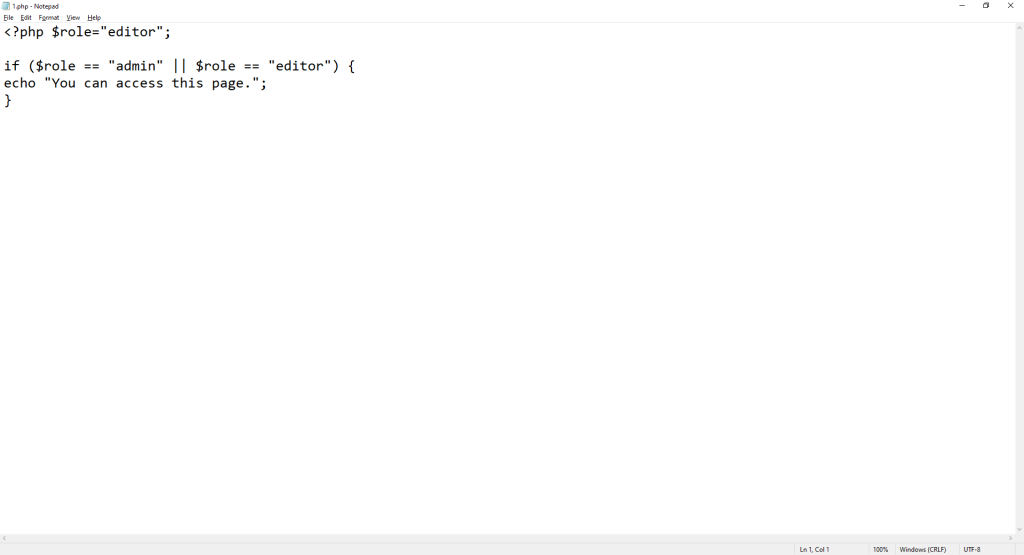
if ($role == "admin" || $role == "editor") {

echo "You can access this page.";

}

The user can access the page if they are either an admin OR an editor.
3. ! (Logical NOT)
The ! operator reverses the result of a condition.
-
If a condition is true,
!makes it false, and vice versa.
Example:
The message is shown only when the user is not logged in.
4. and (Lower-precedence AND)
and works like &&, but has lower precedence, meaning PHP evaluates it later in complex expressions.
Example:
This may be confusing — because true is assigned to $result before and is evaluated.
To avoid mistakes, most developers prefer using &&.
5. or (Lower-precedence OR)
or functions the same as || but also has lower precedence.
Example:
Again, $result gets false first due to precedence rules.
Using || is usually clearer and safer.
6. xor (Exclusive OR)
The xor operator returns true only if ONE of the conditions is true, but not both.
Example:
This allows access if the user is admin OR editor, but not both.
3. Operator Precedence
Operator precedence determines the order in which PHP evaluates operators in a complex expression.
When an expression contains more than one operator, PHP does not evaluate everything from left to right. Instead, it follows a predefined priority system.
Understanding this priority is crucial because it can change the meaning of your code if you’re not careful.
Understanding Precedence Levels
Every operator in PHP has a precedence level.
Logical operators have different priorities:
-
!has higher precedence -
&&and||have medium precedence -
andandorhave lower precedence
This means:
-
!is evaluated before&&or|| -
&&is evaluated before|| -
andandorare evaluated after almost everything else
When in doubt, always use parentheses to make your code clear.
&& vs. and
Both operators perform a logical AND, but they do not behave the same way in complex expressions due to precedence.
-
&&has higher precedence -
andhas lower precedence
Example:
Now compare with:
Why?
-
In the first example,
&&is evaluated before=, so: -
In the second example,
=is evaluated beforeand, so:
This is why and can lead to unexpected results.
Best practice:
👉 Use && for logical AND to avoid confusion.
|| vs. or
Similarly:
-
||has higher precedence -
orhas lower precedence
Example:
But:
Why?
-
With
||, the operator is evaluated before assignment. -
With
or, assignment happens first.
Best practice:
👉 Use || for logical OR to maintain predictable behavior.
Practical Examples
Example 1: Combining Multiple Conditions
Due to precedence:
-
&&is evaluated first -
then
||
So this becomes:
Example 2: Always Use Parentheses for Clarity
A safer and more readable way:
Parentheses make your intention clear and prevent logic mistakes.
4. Using Logical Operators in Conditional Statements
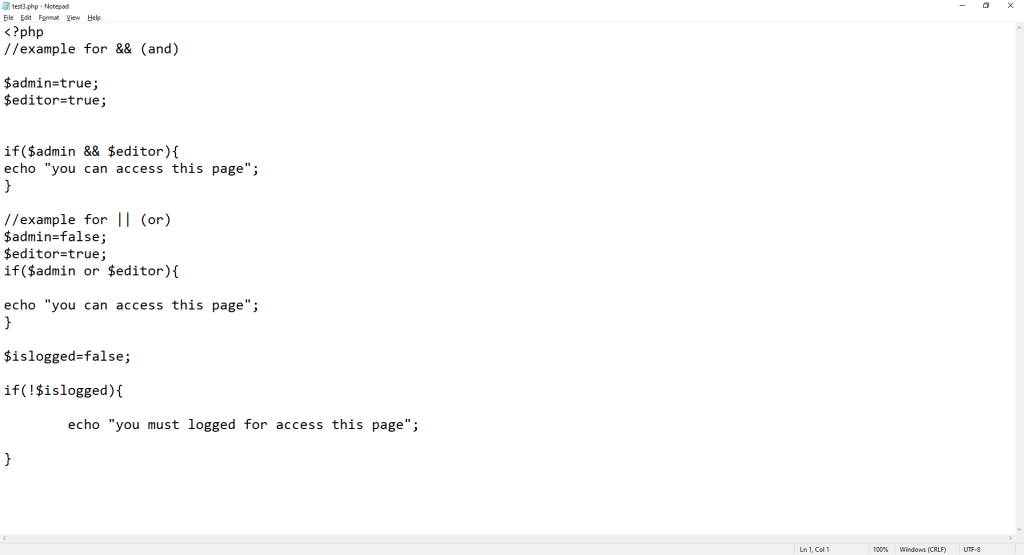
Logical operators are most commonly used inside conditional statements such as if, elseif, while, and for.
They allow you to check multiple conditions at the same time and control how your program behaves based on different scenarios.
Combining Multiple Conditions in if Statements
Often, your program needs more than one requirement to be true before running a block of code. Logical operators help you combine these requirements into a single condition.
1. Using AND (&&)
Use && when all conditions must be true.
Example:
The user can enter only if:
-
they are 18 or older
and -
they have an ID
2. Using OR (||)
Use || when at least one condition needs to be true.
Example:
The user gets access if they are either one of the two roles.
3. Using NOT (!)
Use ! when you want to check that a condition is not true.
Example:
The message is shown only when the user is not logged in.
4. Combining Multiple Operators
You can mix operators to build more advanced conditions.
Example:
This means:
-
Age and ID are required
OR -
The person is a VIP
Common Usage Patterns
Logical operators appear in many everyday programming situations. Here are some typical patterns:
1. Form Validation
Both fields must be filled.
2. Checking User Permissions
Either admin or manager is enough.
3. Preventing Unauthorized Access
Redirects users who are not logged in.
4. Ensuring Safe Operations
The account must have money and must not be frozen.
Logical operators make conditions more flexible, more powerful, and easier to read. They are a core part of writing smart and efficient PHP code.
5. Real-World Examples
Logical operators are used everywhere in real PHP applications.
Here are some common, real-life scenarios that clearly show why logical operators are essential.
1. Login Validation
When a user tries to log in, the system must check that both the email and password are correct.
This requires combining multiple conditions using logical operators.
Example:
How it works:
-
The
&&operator ensures both conditions are true:-
Email matches
-
Password matches
-
-
If either one is incorrect, the login fails.
This is one of the most common uses of logical operators in web applications.
2. User Permission Checks
Different parts of a website may only be accessible to users with specific roles.
Often, there are multiple valid roles, so logical operators help validate permissions.
Example:
How it works:
-
The
||operator checks if either condition is true. -
Admins and editors both have permission.
-
All other roles are blocked.
This pattern appears in dashboards, CMS systems, and backend panels.
3. Form Input Validation
Forms often require multiple fields, and logical operators help ensure users enter valid data before processing the form.
Example:
How it works:
-
!empty()checks that fields are not blank. -
&&ensures all required fields are filled. -
If any required field is missing, the validation fails.
Logical operators help prevent invalid or incomplete form submissions.
6. Common Mistakes and How to Avoid Them
Even experienced developers sometimes make mistakes when using logical operators in PHP.
Most of these errors come from misunderstanding how operators behave, especially in complex conditions.
Below are the most common issues — and how to avoid them.
1. Misunderstanding Precedence
One of the biggest mistakes is forgetting that different operators have different precedence levels (execution priority).
For example:
-
&&has higher precedence thanand -
||has higher precedence thanor -
Assignment (
=) has lower precedence than&&and||
but higher precedence thanandandor
Problematic Example:
You might expect $result to be false, but it becomes true.
Why?= runs before and, so the expression becomes:
How to avoid it:
-
Always use
&&and||in conditions -
Use parentheses to make your logic explicit
2. Using and/or in Assignments
The keywords and and or are valid logical operators, but they have very low precedence, which can make assignments behave incorrectly.
Problematic Example:
You might expect true, but it prints false.
Why?
It is interpreted as:
So $isValid becomes false before evaluating the or.
Best practice:
✅ Use && and || in all assignments and conditions
❌ Avoid and and or unless you fully understand precedence
(They are mainly useful for readability in special cases.)
3. Parentheses Best Practices
Parentheses are your best friend when writing complex conditions.
Even if you know operator precedence, parentheses make your code:
-
easier to read
-
more predictable
-
less error-prone
Good Example (using parentheses):
Why this is better:
-
All grouped conditions are clear
-
No confusion about precedence
-
The logic is readable at a glance
General rule:
👉 When in doubt, add parentheses.
It helps both you and anyone else reading your code.
7. Advanced Tips
Logical operators in PHP offer powerful behaviors that can make your code more efficient and easier to maintain.
Once you understand the basics, these advanced concepts help you write smarter, cleaner logic.
1. Short-Circuit Evaluation
PHP uses something called short-circuit evaluation when processing logical operators.
This means:
-
For
&&
→ If the first condition is false, PHP does not check the second one. -
For
||
→ If the first condition is true, PHP does not check the second one.
This behavior improves performance and prevents unnecessary operations.
Example: Using &&
If $isLoggedIn is false, PHP never calls checkUserPermission().
This avoids extra processing and prevents calling functions when not needed.
Example: Using ||
If $isVIP is true, the function giveDiscount() will never run, because PHP already knows the whole condition is true.
Why Short-Circuiting Matters
-
Better performance (PHP evaluates fewer conditions)
-
Avoids unnecessary function calls
-
Prevents errors (for example, checking variables only when they exist)
2. Writing Clean and Readable Logic
Logical operators can make code easy to read — or very confusing — depending on how you use them.
Writing clean logic is an important skill for every developer.
A. Use Meaningful Variable Names
Good variable names help others understand your conditions quickly.
Bad:
Good:
B. Avoid Overly Long Conditions
If your condition becomes too long, break it into smaller parts.
Instead of:
Do this:
if ($isRegularAllowed || $isVIPAllowed) {
echo “Entry allowed.”;
}
This makes the logic easier to read, test, and debug.
C. Use Parentheses for Clarity
Even when precedence rules make parentheses unnecessary, adding them improves clarity.
Clear example:
Everyone understands what the condition means — immediately.
D. Keep Conditions Consistent
Choose one style and follow it:
-
Always use
&&instead of mixing&&andand -
Always use
||instead of mixing||andor
Consistency makes your code more predictable.
8. Summary
Key Takeaways
-
Logical operators allow you to combine multiple conditions in PHP and control how your code makes decisions.
-
The main logical operators are:
&&,||,!,and,or,xor. -
Operator precedence affects the order in which expressions are evaluated.
-
&&and||have higher precedence thanandandor. -
Misunderstanding precedence can lead to incorrect results.
-
-
Parentheses help make your logic clearer and prevent confusion.
-
Short-circuit evaluation makes your code more efficient by stopping evaluation early when possible.
-
Logical operators are essential in real-world tasks like authentication, permission checks, and form validation.
-
Clean, readable logic makes your code easier to maintain and debug.
When to Use Each Operator
-
&&(AND)
Use when all conditions must be true.
Recommended for almost all AND operations. -
||(OR)
Use when at least one condition must be true.
Ideal for permissions, optional checks, or fallback logic. -
!(NOT)
Use when you need to check if something is not true.
Helpful for login checks, negative states, and form validation. -
and/or
Use with caution.
They have lower precedence and can produce unexpected results in assignment expressions.
Prefer&&and||unless you intentionally want the low-precedence behavior for readability. -
xor
Use when exactly one of the conditions must be true.
Useful for situations where two states cannot both be true at the same time (mutually exclusive options).